
Amazon Ads Management: What to Check Each Week and What to Leave Alone
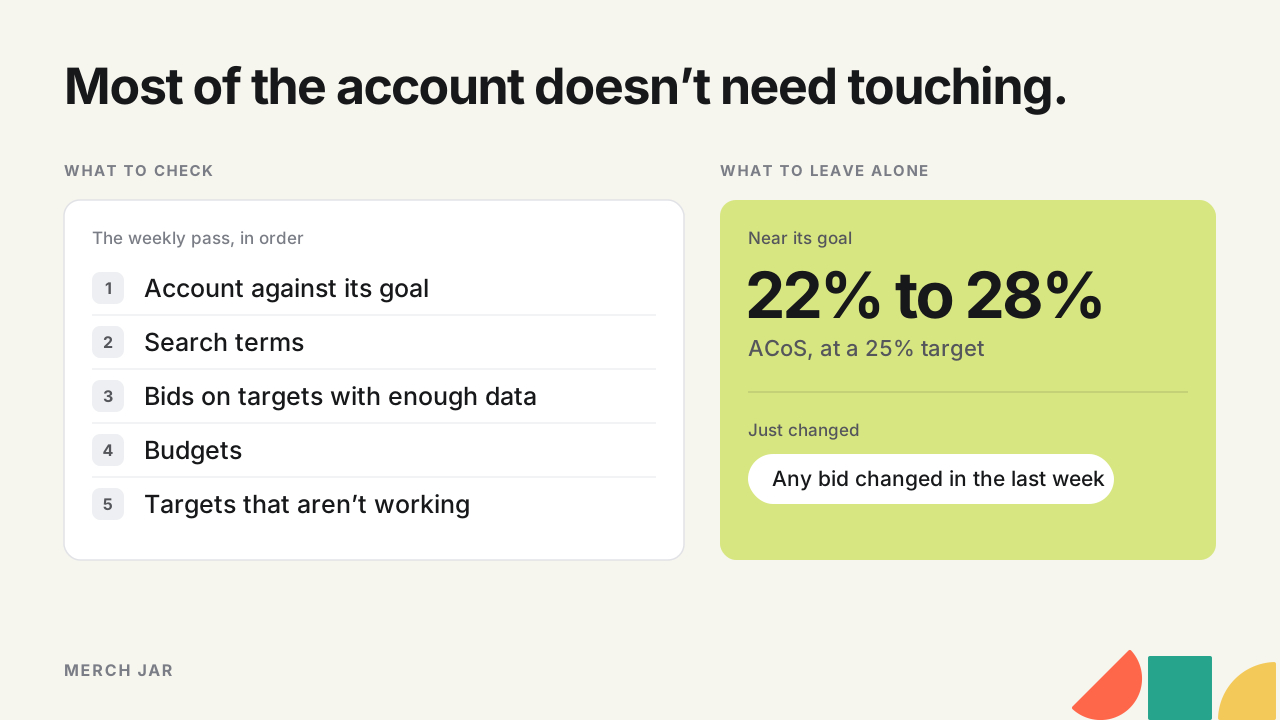
Most of managing Amazon ads happens once a week, in the same order every time. Check the account against its goal first. Then go through search terms, adding negatives for terms that spend without orders and moving the ones that sell into their own keywords. Then adjust bids on targets with enough data to judge, and look at which campaigns ran out of budget. A few minutes a day catches anything broken, and once a month you step back to goals and structure. A lot of the job is leaving things alone, like a target sitting near its goal or a bid you changed four days ago. Written down, the routine works the same on one account or ten.
What management covers once the campaigns exist
Building the campaigns is its own job. Structure and opening bids get decided up front, and our campaign structure guide covers that part. Management is everything after launch, reading what changed and making small changes on the targets that have earned one.
Amazon’s Sponsored Products best practices recommend an always-on approach, with no end date on campaigns. That’s how I run mine. Performance decides what stops, target by target, and the weekly routine decides what changes inside each campaign.
For where each number lives in the console, the Amazon Ads dashboard guide walks through it. This one is about the order you look at things and what you do about each.
How often to check what
| How often | What to look at | What usually changes |
|---|---|---|
| Daily, a few minutes | Spend against a normal day, campaigns out of budget, anything that stopped delivering | Only what’s broken |
| Weekly | The account against its goal, search terms, bids on targets with enough data, budgets | Negatives, new exact keywords, small bid steps, budget moves |
| Monthly | Goals per product, targets that still get no impressions, placements, structure that’s getting in the way | Goals, stuck targets, occasionally structure |
Amazon’s own suggestions sit around this. Its budget guide says to check how your budgets are serving your campaigns at least once every two weeks, and its best practices guide suggests watching metrics at least twice a week in a new campaign’s first week. Weekly suits an established account. Daily bid changes mostly react to noise.
For the monthly placement check, the free placement report analyzer shows what top of search, rest of search and product pages earn per click, and the bidding guide covers what to do with that.
The weekly pass, in order
1. The account against its goal
Start with the totals. Spend, sales and ACoS for the last week or 30 days, against the period before and against your target. That tells you whether this week needs a harder look and roughly where, and you still have to find the campaigns behind it.
So build a list of campaigns to look at. Sorting by spend puts the same big campaigns at the top every week. A more useful list is the campaigns that moved away from their goal, plus the ones spending differently since a recent change. If you want a refresher on what each number measures, our advertising metrics guide has the definitions.
2. Search terms
The search term report shows what shoppers actually typed before they clicked your ad. Two kinds of change come out of it. Terms that keep spending without an order go in as negatives once they’ve had enough clicks to judge, and our negative keywords guide gives a threshold for that. Terms that sell move into exact match as their own keywords.
I graduate a search term after two separate orders. One shopper buying two units looks the same in the sales column and could just be a fluke, so a sales figure on its own doesn’t move it.
If several campaigns can serve the same search term, count its clicks across all of them. Auto close match, loose match, broad and phrase each list the term separately, so a term with 6 clicks in one and 5 in another can look like it needs more time when it’s already had plenty.
The search term report guide covers reading the report before you change anything, and the free search term report analyzer does the first sort in your browser, listing the terms and words that spent money without an order.
3. Bids on targets with enough data
Raise bids on targets beating your target ACoS with at least a couple of orders, and lower them on targets above it. I use the last 30 days most weeks and leave today and yesterday out, because orders from the newest clicks may not all be in yet. Go longer when there isn’t enough data, and shorter when sales are moving fast, like coming out of the holidays.
Keep the steps small. I raise by a flat 10%, because a big jump can push the average CPC up and throw ACoS straight back off target. Our keyword bidding strategy works out the amounts from your margin.
4. Budgets
Amazon’s budget guide says a campaign is out of budget once it has used its daily budget, and its ads aren’t eligible again until the budget resets at midnight. Campaign manager shows the out-of-budget notifications. Then look at why each one ran out. A campaign meeting its goal and running out early is the case for more budget. A campaign that spends its full budget without meeting the goal needs its bids or targets looked at before it gets more money. And one that regularly leaves budget unused won’t deliver more from a higher number.
5. Targets that aren't working
Use a longer range here, 90 days. A target with no orders after 20 to 40 clicks is a candidate to pause, and broad match or a product that converts slowly should sit nearer the top of that range before it goes. A target with one order needs roughly double the clicks.
Targets with no impressions get small weekly raises, with a max bid so they can’t climb forever. If 90 days of raises still haven’t got one shown, the bid probably isn’t the problem. Start the target over in a new campaign or ad group.
What to leave alone
Most weeks, most of the account doesn’t need touching.
A target close to its goal is doing its job. With a 25% target ACoS, I don’t raise every bid under 25%. I raise under 22% and don’t cut until it’s over 28%, and anything in between stays put. No sense messing with a good thing.
Leave a bid alone for at least a week after you change it. I don’t believe there’s a learning period for a bid. The auction runs in real time with whatever bid is set, so the bid isn’t getting smarter by being left alone. What takes time is the data, enough clicks since the change to tell whether it worked. Change it again before those come in and you can’t tell which change did what.
I very rarely pause a whole campaign. A campaign’s ACoS is an average, and it often comes from one or two targets doing most of the damage while the rest sit on target. A hypothetical campaign over 30 days shows how that plays out.
| Target | Spend | Sales | ACoS |
|---|---|---|---|
| Keyword A | $250 | $1,000 | 25% |
| Keyword B | $150 | $600 | 25% |
| Keyword C | $350 | $0 | no orders |
| Campaign total | $750 | $1,600 | 46.9% |
Against a 30% target, the campaign looks like it should go. Pause it and keywords A and B stop too. Lower or pause keyword C instead, and the same campaign runs at $400 of spend against $1,600 in sales, a 25% ACoS.
I also don’t cut bids on a product ranked at the top of search for a keyword. That can cost you the rank, because a competitor who keeps bidding can outsell you on that search. Branded keywords are the exception.
Write down what you changed
Keep a short log beside the numbers, with the date and what you changed and a line on why. Next week’s review starts from it instead of from scratch, and it shows which targets to leave alone because you only just touched them. When someone else takes over the account, it’s the handover.
Running the same routine across several accounts
Run the same pass in the same order on every account, and keep the differences in each account’s goals. Target ACoS comes from each product’s margin, so one account can carry several targets, and the weekly pass checks each product against its own. Our guide to a good ACoS covers setting them.
Amazon’s manager accounts help with access. You can link advertising accounts to one manager account, including accounts from other marketplaces, and view and export performance across the linked accounts from the accounts overview page. That puts the first step, checking each account against its goal, in one place.
Inherited accounts need one more rule. Taking over an account doesn’t mean rebuilding it. Before you change a structure you wouldn’t have built, work out what it’s actually stopping you from doing. If one product needs its own budget, that’s a reason to change it. If the structure is just unfamiliar, leave it and start the weekly pass.
Where this breaks down is time. Each check above is a filter and an action, like targets with two or more orders over 30 days and an ACoS under 22% get a 10% raise. By hand that’s the same filter, account after account, every week. Written down as rules, it can run on a schedule. In Merch Jar, each check can be saved as a Segment with logic you can read, and a Workflow attached to it runs the change daily or weekly once you turn it on.
Quick answers
What does Amazon ads management include?
It’s the recurring work that comes after setup. Each week that means checking the account against its goals, negating and harvesting search terms, adjusting bids on targets with enough data and checking budgets. Building the campaigns is the setup job that comes before it.
How often should you check Amazon ads?
Make changes weekly, and take a few minutes each day to catch problems like a campaign out of budget or a jump in spend. Step back to goals and structure about once a month. Amazon suggests checking budgets at least every two weeks.
How long should you wait after changing a bid?
Until enough clicks have come in since the change to judge it. The bid itself doesn’t learn, so time alone doesn’t help. On most targets that means at least the next weekly pass.
Should you pause a campaign with a high ACoS?
Usually not. Look at the targets inside it first. One or two of them often carry most of the cost, and pausing those leaves the rest of the campaign running.
Where do you manage Amazon ads?
In the Amazon Ads console. Amazon’s own guides point you to campaign manager there, including for out-of-budget notifications.
Check your own account
If your account is connected to Merch Jar, the Account review skill in our Library looks over its performance from your own AI client and points out the waste and opportunities worth your attention. Ask it to “Review my account and tell me what needs attention.” It reads and reports, including how much of the account it was able to check, and nothing in the account changes. You decide what to act on.